Ubisoft Connect
What is Ubisoft Connect — and What Version 164.1.0.12709 Means
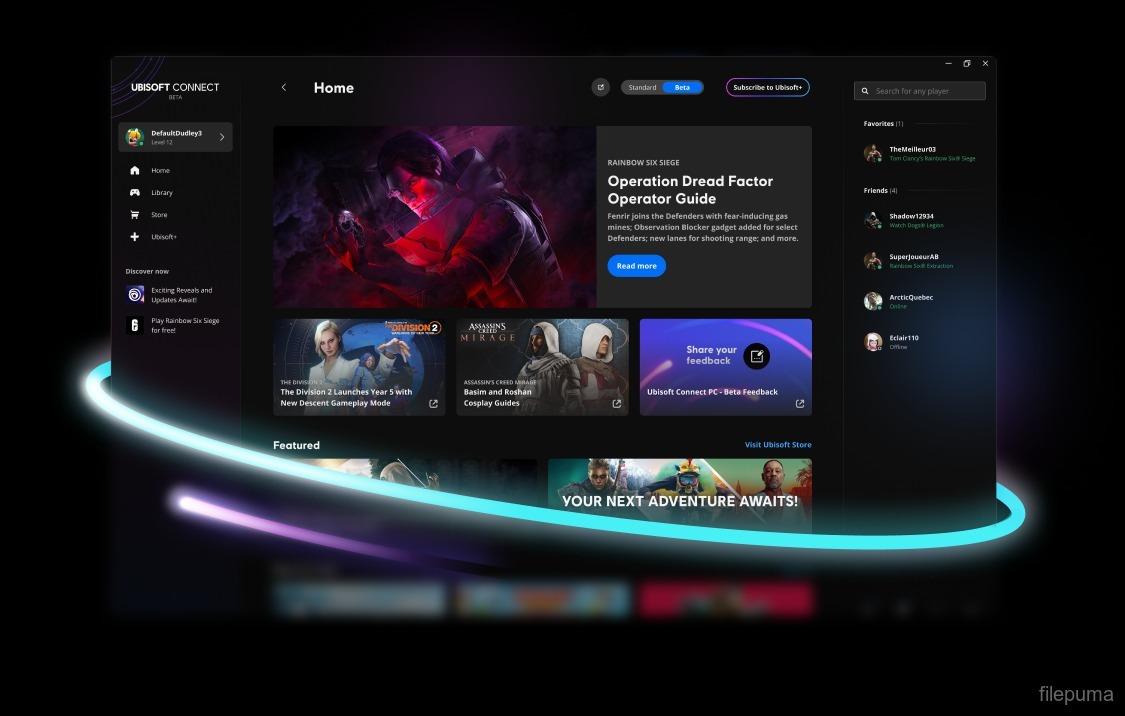
Ubisoft Connect is the central launcher / DRM / social-hub / game-store client for games from Ubisoft.
- As of version 164.1.0.12709, Ubisoft Connect remains the required client if you want to purchase, install, update and launch Ubisoft PC games (even if bought through another platform).
- It bundles several functions: game library management, digital rights protection (DRM), in-game reward/loyalty system (formerly “Ubisoft Club”), cross-platform account linking & social features (friends, profile, etc.), and access to the Ubisoft Store for new purchases.
- For many users, this version serves as the “default” Ubisoft launcher — especially for PC gamers who regularly play Ubisoft titles.
In short: 164.1.0.12709 is a relatively recent stable-ish build (though not the newest) that continues Ubisoft’s long-term plan of unifying game delivery, social features, store, and DRM under one client.
What Works & What Ubisoft Connect Does Well
- Unified access to all Ubisoft services & games. Rather than juggling multiple launchers or executables, Ubisoft Connect gives you a single hub for storing, launching, updating, and managing all Ubisoft titles.
- Integrated store + loyalty / reward system. Players earn in-game “units/points” for achievements in Ubisoft games, which can be redeemed for cosmetics, content, or benefits—across different Ubisoft games.
- Cross-platform login, account linking & social features. Friend lists, shared profile, cross-progression (in supported titles), and consistent DRM/licensing — which simplifies multi-game, multi-device Ubisoft ecosystems.
- Relatively smooth installation and update handling. For most users with compatible hardware & OS, Ubisoft Connect installs cleanly and auto-updates as intended.
For gamers who mainly play Ubisoft titles and prefer convenience and integration, Ubisoft Connect remains a central piece — and 164.1.0.12709 is typically satisfactory for those needs.
What Users Complain About — Known Problems and Recurring Issues
Despite its conveniences, many users report frustrations — especially linked to certain versions (including builds around 164.x) — which highlight some downsides:
- Launcher crashes or fails to start: Some users say the launcher “refuses to work,” or crashes upon startup, even after reinstalling, cleaning cache, or retrying multiple times.
- Login or connection issues: Others get “service unavailable,” repeated login-prompts, or network-related errors; sometimes clearing cache or using VPN/firewall adjustments helps.
- Instability after updates — especially when users are “forced” to a new “beta” or updated launcher: in some cases, games fail to launch or the store/launcher UI behaves oddly.
- DRM and mandatory launcher requirement: Because Ubisoft Connect is required for nearly all Ubisoft PC games, whenever the launcher misbehaves, it can effectively block access to owned games.
- Mixed experiences on non-standard OS / compatibility layers: Players using Linux with compatibility tools (Wine, Proton, wrappers) often report the launcher stops working after updates, or becomes unresponsive.
To quote a recent user from a public forum:
“Ubisoft Connect crashes on startup 95% of the time… After installer, took probably 20 attempts to boot it up before I saw login screen.”
This shows the fragility — even for users on supported setups.
Who Should Use Ubisoft Connect 164.1.0.12709 — And Who Should Be Cautious / Avoid
Good candidates:
- Players who mainly own and play Ubisoft games, and want a unified launcher + store + reward + social system.
- Users on a stable, up-to-date Windows PC — for whom installation and updates run smoothly.
- People who value convenience: integrated store, achievements / rewards, automatic updates, cross-game profile, etc.
Use with caution or avoid if:
- You rely on launcher stability (for competitive / frequent gaming) — the reported crashes, login/connect issues, and broken updates make this risky.
- You use non-standard OS (Linux, macOS via wrapper, older system) — compatibility problems are fairly common.
- You dislike mandatory DRM — since almost all Ubisoft PC games require Ubisoft Connect running; any launcher bug means no access to your games.
Common Issues & Workarounds (Based on User Reports)
If you run into trouble with Ubisoft Connect 164.1.0.12709, some of the common fixes that reportedly help:
- Clear cache / temporary files, especially if login or launch fails.
- Reinstall from official installer — sometimes corrupt updates or partial installations cause problems.
- Run as administrator — to avoid permission issues (especially write access, DRM handshake, patching).
- Check firewall / antivirus / network settings — sometimes security software or ISP filtering interferes with launcher connectivity.
- If on Linux / Wine / wrapper — expect instability, or consider running on a supported OS; some users reported the launcher becoming unresponsive after updates.
My Take — Is 164.1.0.12709 Still Worth It?
Yes — but with reservations. For many Ubisoft-centric PC gamers with up-to-date Windows PCs, Ubisoft Connect remains the necessary and practical way to launch and manage games, get updates, track rewards and stay connected.
That said — given the frequency of user-reported crashes, launcher-related bugs, and DRM-dependency, it’s not a perfect system. If you depend on reliability (e.g. competitive gaming, frequent sessions), the risks might outweigh the benefits.
Note: Tools files may be marked as malicious by antivirus. Be sure to check the file before downloading.
Comments & Ask Questions
Comments and Question
There are no comments yet. Be the first to comment!